
Choosing a Venue for Professional Development

A Practical Planning Guide
Choosing a professional development venue involves more than finding an available room. The location, layout, technology, catering and level of onsite support can all influence participant concentration, facilitator confidence and the overall quality of the learning experience.
A venue that works well for a short presentation may not suit a full-day workshop, certification course or leadership program. Organisers should begin with the learning objective and then select a venue that supports the required activities, participant numbers and delivery format.
A good professional development venue should offer an accessible location, flexible room layouts, comfortable seating, reliable audiovisual technology, Wi-Fi, breakout areas, catering and onsite support. It should help participants remain focused while giving facilitators the space and equipment needed to deliver effectively.
Why the Venue Matters for Professional Development
The learning environment affects how people participate, communicate and absorb information.
A suitable venue can support:
- Participant concentration
- Facilitator confidence
- Group discussion
- Practical activities
- Session timing
- Technology reliability
- Networking
- Accessibility
- Professional presentation
- Workplace application
A standard office meeting room may be suitable for a brief discussion but can become restrictive during a full-day program. Participants may lack table space, comfortable seating, clear sightlines or access to refreshments.
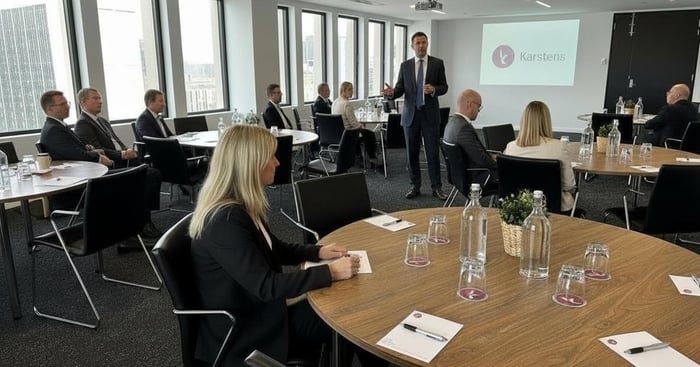
Purpose-built training venues like Karstens are designed around presentations, practical exercises, collaboration and full-day participation.
How to Choose a Venue for Professional Development
1. Define the Learning Objective
Start by deciding what participants should know, practise, decide or complete.
For example, a presentation-based briefing may require theatre seating and a large screen. A leadership workshop may need a U-shape or cabaret layout that supports discussion and group activities.
The learning objective affects:
- Room layout
- Participant capacity
- Technology
- Breakout requirements
- Session duration
- Catering
- Facilitator preparation
- Assessment methods
Avoid booking a room before the program format is clear.
2. Confirm Participant Numbers
Estimate attendance and ask the venue when final numbers must be confirmed.
The room should provide enough space for participants to work comfortably without feeling empty or disconnected.
Consider:
- Expected attendance
- Maximum and minimum numbers
- Table space
- Participant movement
- Activity requirements
- Potential changes in attendance
- Room-resizing options
- Facilitator and support staff
The largest room is not always the best choice. An oversized space can make interaction more difficult, while an overcrowded room can reduce comfort and concentration.
3. Choose an Accessible Location
Location affects attendance, punctuality and participant stress.
A central CBD venue can provide convenient access to public transport, hotels, cafés, restaurants and business services. It may also be easier for interstate presenters or delegates attending a multi-day program.
Check:
- Train, tram and bus access
- Nearby parking
- Building entry
- Accessibility
- Local accommodation
- Airport connections
- Signage
- Arrival instructions
Location is important because it influences how easily participants can reach the venue and arrive on time. An accessible venue near transport, parking and accommodation reduces travel stress and creates a more professional experience.
Send clear directions and access information before the event.
4. Select the Right Room Layout
The room configuration should support the learning style.
Classroom Layout
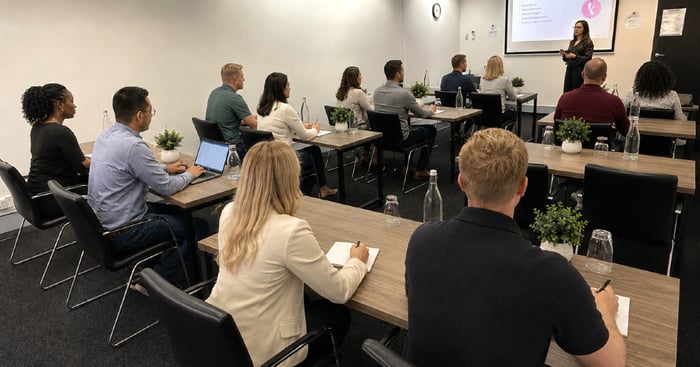
Classroom seating suits structured courses, certification programs and sessions where participants need tables for laptops, workbooks and note-taking.
Cabaret Layout
Cabaret seating supports collaborative learning, workshops and small-group activities. Participants can work together while maintaining sightlines to the facilitator.
U-Shape Layout
A U-shape encourages discussion, demonstrations and direct interaction between the facilitator and participants.
Boardroom Layout
Boardroom seating suits executive development, strategic planning and smaller leadership programs.
Theatre Layout
Theatre seating works well for presentations, briefings and larger audiences but provides limited workspace for practical activities.
| Room layout | Best suited to | Main benefit | Main limitation |
|---|---|---|---|
| Classroom | Courses and certification | Individual workspace | Less group interaction |
| Cabaret | Workshops and collaboration | Encourages discussion | Some participants may face away from the screen |
| U-shape | Demonstrations and discussion | Strong facilitator interaction | Uses more floor space |
| Boardroom | Leadership and planning | Focused conversation | Limited suitability for larger groups |
| Theatre | Presentations and briefings | Efficient use of space | Limited table space |
5. Consider Full-Day Comfort
Professional development programs often require participants to remain in the same environment for six to eight hours.
Comfort is therefore an operational requirement, not simply a preference.
Look for:
- Ergonomic seating
- Practical table space
- Natural light
- Climate control
- Clear sightlines
- Suitable acoustics
- Space for laptops and materials
- Breakout areas
- Access to refreshments
- Room to move between activities
A comfortable full-day training room should provide ergonomic seating, suitable tables, natural light, clear screen visibility, climate control and enough space for participants to work and move comfortably.
Poor seating, glare, noise or limited workspace can distract participants from the learning.
6. Review AV and Technology
Reliable technology helps facilitators present confidently and prevents valuable training time from being lost.
Depending on the program, you may need:
- Presentation screens
- Projectors or digital displays
- HDMI or USB-C connectivity
- Wireless presentation
- Speakers
- Microphones
- Reliable Wi-Fi
- Video conferencing
- Hybrid capability
- Charging access
- Polling tools
- Onsite technical assistance
Ask what equipment is included and what may attract an additional charge.
The facilitator should test the actual laptop, presentation files, videos and online platform before the event. Bring adaptors and keep backup copies of important files.
7. Check Hybrid Training Capability
Hybrid professional development includes in-room and remote participants in the same live session.
It requires more than placing a laptop at the front of the room.
A suitable setup may include:
- Professional cameras
- Presenter microphones
- Room microphones
- Speakers
- Reliable internet
- Presentation sharing
- Video-conferencing software
- Suitable screen placement
- Chat monitoring
- Technical support
Remote attendees must be able to hear room questions, view presentation content and contribute to activities.
Ask how the venue supports camera positioning, microphone coverage and technical testing.
Learn about Hybrid training
8. Assess Breakout Spaces
Breakout spaces can support learning beyond the main training room.
They may be used for:
- Small-group exercises
- Coaching conversations
- Team discussions
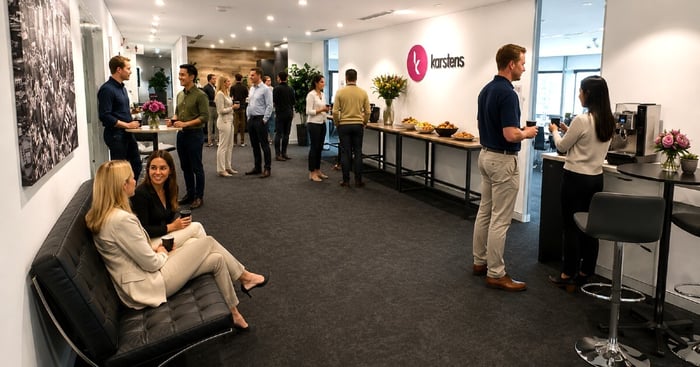
- Refreshment breaks
- Networking
- Informal reflection
- Facilitator preparation
- Private conversations
Confirm whether these spaces are dedicated to your group or shared with other events.
For programs involving several activities, additional breakout rooms may be required.
9. Review Catering and Dietary Management
Catering affects participant energy, concentration and satisfaction.
A full-day program may require:
- Morning tea
- Lunch
- Afternoon tea
- Continuous water
- Coffee and tea
- Healthy options
- Dietary meals
- Flexible break timing
A professional development venue should offer fresh catering, quality refreshments and clear processes for managing dietary requirements. Catering should be coordinated with the agenda so breaks support rather than interrupt the learning program.
Collect dietary information during registration and provide it to the venue by the required deadline.
Ask how allergy-related and other specialised meals are identified and served.
10. Confirm Onsite Support
The venue team can play an important role before and during the event.
Onsite support may include:
- Preparing the room layout
- Testing AV
- Assisting presenters
- Coordinating catering
- Arranging signage
- Supporting participant arrivals
- Managing room changes
- Troubleshooting technology
- Responding to timing changes
This allows trainers and organisers to focus on the participants instead of managing venue logistics.
Provide the venue with a final agenda, participant numbers, catering times and technical requirements before the program.
11. Compare Pricing and Inclusions
Do not compare venues using room hire alone.
A lower headline price may exclude services that another venue includes.
Possible additional costs include:
- AV equipment
- Wi-Fi
- Technical assistance
- Catering
- Room setup
- Breakout rooms
- Overtime
- Weekend charges
- Minimum spends
- Cancellation fees
Professional development venue hire should clearly identify the room, agreed layout, standard AV, Wi-Fi, catering, refreshments, breakout spaces and onsite support. Optional services and additional charges should be shown separately.
Request a detailed written proposal and compare total value per participant.
12. Arrange a Venue Inspection
A venue inspection allows you to confirm that the room matches the program requirements.
Review:
- Room size
- Furniture
- Sightlines
- Lighting
- Acoustics
- AV equipment
- Breakout areas
- Catering spaces
- Accessibility
- Building access
- Signage
- Overall presentation
Meet the venue team and ask who will support the program on the day.
For interstate events, request a virtual inspection, current photographs or a detailed video walkthrough.
Purpose-Built Training Venue Versus Other Venue Types
| Consideration | Purpose-built training venue | Hotel meeting room | Coworking space | Internal office room |
|---|---|---|---|---|
| Room design | Created for learning and business events | Multi-purpose | Usually designed for general meetings | Designed for internal use |
| Furniture | Often flexible and ergonomic | Varies | May be fixed | May have limited options |
| Built-in AV | Commonly integrated | May be additional | Varies | Depends on office equipment |
| Technical support | Often available onsite | Varies by property | Usually limited | Relies on internal staff |
| Breakout spaces | Frequently available | May be available | Often shared | Usually limited |
| Catering | Coordinated with the program | Commonly available | Often external | Requires separate organisation |
| Full-day comfort | Designed for longer sessions | Varies | Varies | May not suit large groups |
| Flexibility | Multiple layouts | Depends on room | Often limited | Limited by furniture |
| Training suitability | Strong | Suitable in many cases | Better for smaller sessions | Best for simple internal meetings |
The best choice depends on the objective, group size, budget and level of support required.
Choosing a Venue for Different Program Types
Full-Day Professional Development
Prioritise seating, table space, natural light, catering and regular breaks. Participants should be comfortable throughout the entire day.
Multi-Day Training
Look for consistent room setup, storage options, nearby accommodation and catering variety. Repeated programs benefit from familiar technology and layouts.
Certification Programs
Confirm table space, quiet conditions, reliable technology, privacy and assessment requirements.
Leadership Development
Choose a professional environment that supports confidential discussion, reflection, role-playing and small-group activities.
Collaborative Workshops
Flexible furniture, cabaret seating, whiteboards and breakout spaces can support interaction and problem-solving.
Hybrid Professional Development
Confirm cameras, microphones, reliable internet, screen placement and facilitation support for remote attendees.
Multi-City Programs
Using one venue partner across several cities can help maintain consistent room layouts, technology, catering and service standards.
Professional Development Venue Checklist
Before Requesting a Quote
- Define the learning objective.
- Confirm dates and participant numbers.
- Select the preferred room layout.
- Identify technology requirements.
- Plan catering and breaks.
- Collect accessibility information.
- Determine whether hybrid support is needed.
When Comparing Venues
- Review location and transport access.
- Compare room comfort and layouts.
- Check AV and Wi-Fi.
- Assess breakout areas.
- Compare catering.
- Review onsite support.
- Confirm all inclusions and terms.
During a Venue Inspection
- Check furniture and room condition.
- Review screen sightlines.
- Test presenter connectivity.
- Inspect breakout areas.
- Review catering spaces.
- Confirm building access and signage.
- Meet the event team.
Before Confirming the Booking
- Obtain written inclusions.
- Confirm final-number deadlines.
- Review payment and cancellation terms.
- Identify the onsite contact.
- Confirm technical testing arrangements.
Before the Event
- Send the final agenda.
- Confirm presenter files.
- Confirm the room setup.
- Provide dietary information.
- Arrange signage.
- Test technology.
- Send arrival details to participants.
Common Venue Selection Mistakes
Avoid:
- Choosing based only on price
- Booking before defining the learning objective
- Selecting a room that is too large or small
- Ignoring participant comfort
- Failing to test AV
- Assuming Wi-Fi will support every activity
- Overlooking breakout space
- Ignoring accessibility
- Failing to confirm dietary management
- Misunderstanding what is included
- Choosing an unsuitable layout
- Booking without an inspection
- Failing to brief the venue team
- Leaving hybrid requirements until the last minute
What Makes a Good Professional Development Venue?
A good professional development venue combines an accessible location, comfortable purpose-built rooms, flexible layouts, reliable technology, Wi-Fi, breakout areas, quality catering and onsite support. It should make it easier for facilitators to deliver and for participants to remain focused, comfortable and involved.
Professional Development Venues at Karstens
Karstens provides purpose-built conference and training venues in Melbourne, Sydney, Brisbane, Perth and Adelaide.
Depending on the venue, room and selected package, facilities may include:
- Classroom, cabaret, U-shape, boardroom and theatre layouts
- Built-in presentation technology
- Reliable Wi-Fi
- Hybrid capability
- Breakout areas
- Ergonomic seating
- Natural daylight
- In-house catering
- Dietary management
- Onsite event and technical assistance
Karstens can support full-day, multi-day and recurring professional development programs.
Organisations delivering training in several cities can work with one national venue partner and dedicated account manager to coordinate room layouts, technology, catering and event requirements.
Confirm individual room features and inclusions when requesting a proposal.
Frequently Asked Questions
What Should You Look for in a Professional Development Venue?
Look for an accessible location, suitable room layout, comfortable furniture, reliable AV, Wi-Fi, catering, breakout space and onsite assistance. The venue should support the learning objective and planned activities.
How Far in Advance Should You Book a Training Venue?
Book as early as possible, particularly for larger groups, recurring programs or popular business dates. More complex hybrid and multi-day programs may require additional planning time.
What Is the Best Room Layout for Professional Development?
The best layout depends on the program. Classroom suits structured courses, cabaret supports collaboration, U-shape encourages discussion, boardroom works for leadership sessions and theatre suits presentations.
Why Is Natural Light Important in a Training Room?
Natural light can create a more comfortable environment and reduce the enclosed feeling associated with full-day training. Screen visibility and glare should still be checked.
What AV Equipment Should a Training Venue Provide?
A venue should clearly identify available screens, connectivity, audio, microphones, Wi-Fi and video-conferencing capability. Confirm equipment and specialist requirements before booking.
Do Professional Development Venues Provide Catering?
Many venues offer catering for full-day and multi-day programs. Ask about menu options, timing, refreshments and dietary management.
How Should Dietary Requirements Be Managed?
Collect accurate dietary information during registration and provide it to the venue before the required deadline. Confirm how specialised meals will be labelled and served.
What Makes a Venue Suitable for Hybrid Training?
A hybrid venue should provide reliable internet, cameras, microphones, speakers, presentation sharing, suitable screens and technical support.
Why Are Breakout Areas Important?
Breakout areas support group exercises, networking, refreshments and informal discussion away from the main room.
Should You Inspect a Venue Before Booking?
An inspection is recommended for important, complex or unfamiliar events. It allows you to confirm room suitability, technology, access and support.
What Should Be Included in a Venue Quote?
The quote should clearly identify the room, layout, AV, Wi-Fi, catering, refreshments, breakout spaces, support and any additional charges.
How Can Organisations Maintain Consistency Across Multiple Cities?
Use a national venue partner that can coordinate comparable layouts, technology, catering and service standards through one contact.
Plan Professional Development with Karstens
The right venue should support the learning objective, participant comfort, facilitator confidence and smooth delivery.
Contact Karstens to discuss:
- Professional development venues
- Training room availability
- Flexible configurations
- Built-in AV
- Hybrid training
- Catering
- Venue inspections
- Multi-day programs
- Recurring training
- Multi-city delivery
- Tailored proposals
To assist you with planning click hyperlink the complete guide to corporate training venues